¶ Entra ID SSO
To use the LOLYO and Microsoft Entra ID (eh. AzureAD) authentification side by side, you have to create an “App registration” in Azure Active Directory.
After configuration, you’ll see an extra button for login with AAD if the have an corresponding account.
If you hit that button, the use will be redirected to Azure authentication system (login.microsoftonline.com). After entering the credentials the user will be redirect back to LOLYO.
LOLYO will compare the AAD claim name of the user (in normal cases the email) with the code/email of LOLYO userlist. If they match, a corresponding link is created.

¶ How to create an Azure App registrations
Open: https://portal.azure.com/
Go to your “Microsoft Entra ID”, „App registrations“ and hit “New registration”:
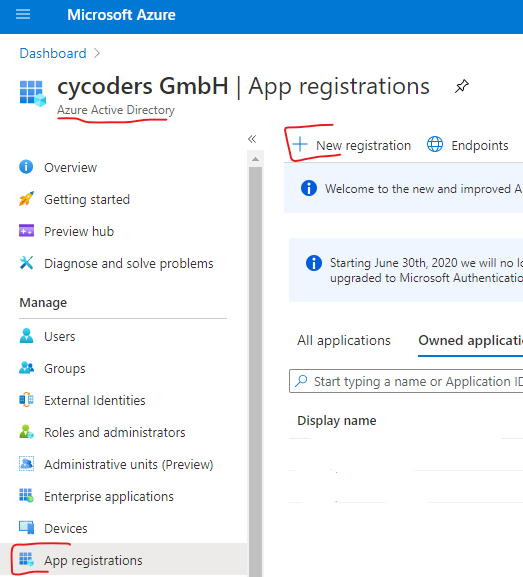
- In the form enter a name, like “LOLYO SSO”
- Choose “Accounts in this organizational directory only”
- Enter on “Redirect URI”: Webhttps://yourdomain.lolyo.net/
- Hit register
- In “Overview” hit “Add an Application ID URI” on the right side.
- Select “Add a scope”, note the “Application ID URI” and “Save and continue”
- Close the Scope block.

Go to “Authentification” and enter in the “Logout URL” the value “https://yourdomain.lolyo.net/Account/Logout.
Hit Save.
Go to link “Endpoints” and please send us the value of:
- “Federation metadata document”
- “Application ID URI” from above.
Also send us:
- Application (client) ID
- Directory (tenant) ID
We will configure LOLYO with the submitted information and the “SSO Login” will appear.
If you want we can also change the naming of “SSO Login”.
Additional settings for UserSync
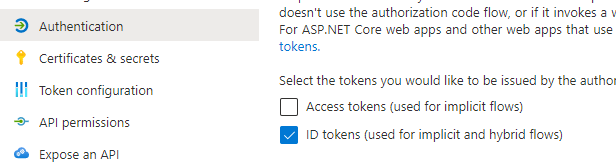
Go to Authentificationand check ID tokens.
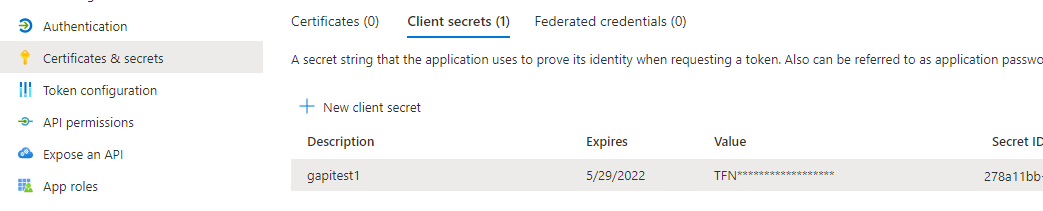
Go to Certificates & secrets and generate a Client secret. We need the Secret ID and Value.
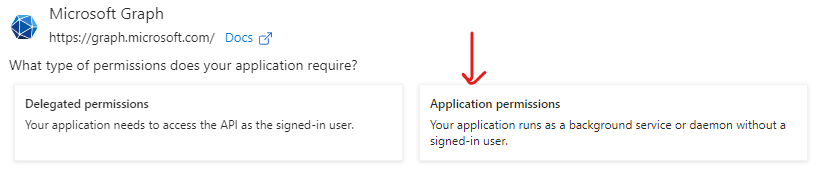
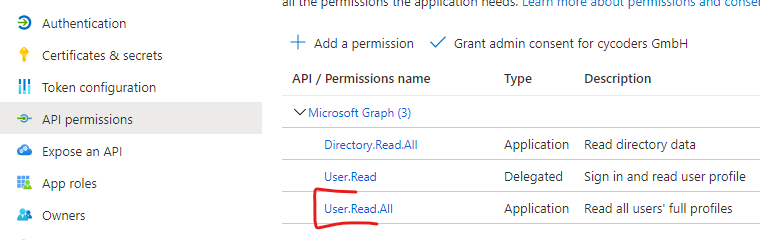
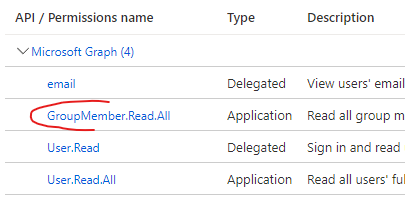
Go to API permissions and add the permission:
- User.Read.All
• GroupMember.Read.All
use Applicationpermissions
GroupMember.Read.All Permission.
¶ Information in rare cases
Claims Mapping
Application ID URI:
https://docs.microsoft.com/en-us/azure/active-directory/develop/active-directory-claims-mapping
Microsoft:
This does require the requested token audience to use a verified domain name of your Azure AD tenant, which means you should ensure to set the Application
ID URI (represented by the identifierUris in the application manifest) for example to https://contoso.com/my-api or (simply using the default tenant name) https://contoso.onmicrosoft.com/my-api.
If you're not using a verified domain, Azure AD will return an AADSTS501461 error code with message:
"AcceptMappedClaims is only supported for a token audience matching the application GUID or an audience within the tenant's verified domains. Either change the resource identifier, or use an application-specific signing key."